Connection Troubleshooting
This guide covers the most common issues when connecting Bookcamp to your Plex server.
Written By Max
Last updated About 1 year ago
Disabling Relay
Relay is a Plex feature that allows remote access to your Plex server from outside your home network. While useful for Plex's own apps, third-party clients like Bookcamp often experience issues when Relay is enabled.
The Problem
When Relay is enabled alongside a regular remote connection, your Plex server may send random 500 errors to Bookcamp until the feature is disabled. This isn't a Bookcamp bug—it's a known incompatibility with how Plex handles third-party connections.
The Solution
⚠️ As a general rule, disable Relay if you've already configured direct remote access to your Plex server.
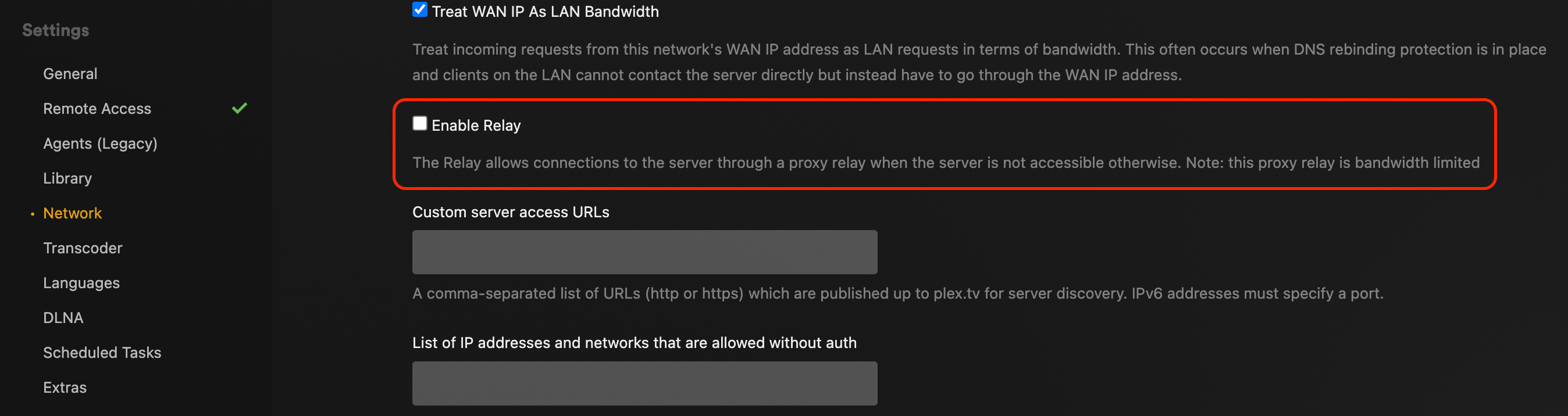
To disable Relay:
Open Plex Web App and navigate to Settings
Go to Network under the Settings menu
Uncheck "Enable Relay"
Save your changes and restart Plex Media Server
NAT Hairpinning / Loopback
If you're using Bookcamp on the same local network as your Plex server, you may need to configure NAT Hairpinning (also called NAT Loopback) on your router. Without this configuration, you might be unable to load covers or start playing books when accessing your server using its external address from inside your network.
What is NAT Hairpinning?
NAT Hairpinning allows devices on your local network to access local services using the external/public IP address or domain name, rather than the internal IP address.
How to Configure
Configuration steps vary by router manufacturer and model. Generally, you'll need to:
Access your router's admin panel
Look for settings labeled "NAT Loopback," "NAT Hairpinning," or "NAT Reflection"
Enable the feature
Apply the settings and restart your router if required
Alternative Solution: If your router doesn't support NAT Hairpinning, you can work around this by always using your mobile connection.
For specific configuration help, consult your router's manual or manufacturer's support site.